Desktop CNC Routers
Explore TwoTrees desktop CNC routers designed for makers, hobbyists, prototyping workshops, and small businesses. From compact CNC machines for detailed engraving and PCB projects to larger benchtop CNC routers for woodworking, acrylic, plastics, and light aluminum milling, this collection helps you compare the right machine for your workspace and projects. Choose from beginner-friendly 3018 models, versatile TTC450 machines, larger-format TTC6050 and TTC-H40 systems, or the advanced X5 5-axis CNC router.
-
Save $140.00
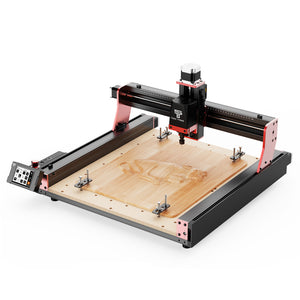

Twotrees TTC450 PRO CNC Router Machine(EU US Direct Ship, VAT Included)
Regular price From $499.00Regular price$639.00-$140.00 Sale price From $499.00 -
Save $300.00

 New
NewTwotrees TTC450 Ultra CNC Router Machine
Regular price From $699.00Regular price$999.00-$300.00 Sale price From $699.00 -
Save $400.00


Twotrees TTC6050 CNC Router Machine
Regular price From $1,599.00Regular price$1,999.00-$400.00 Sale price From $1,599.00 -
Save $300.00


Twotrees TTC-H40 CNC Router Machine
Regular price From $1,699.00Regular price$1,999.00-$300.00 Sale price From $1,699.00 -
Save $140.00
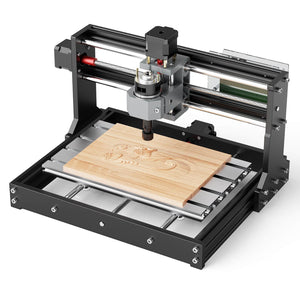

Twotrees TTC3018 CNC Router Machine
Regular price From $159.00Regular price$299.00-$140.00 Sale price From $159.00 -
Save $130.00

 New
NewTwotrees TTC3018 Pro CNC Router Machine
Regular price From $199.00Regular price$329.00-$130.00 Sale price From $199.00 -
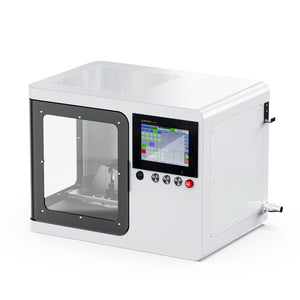
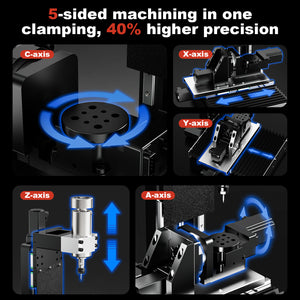
Twotrees X5 5-axis CNC Router Machine
Regular price $9,999.00Regular price$9,999.00Sale price $9,999.00


Know More
Desktop CNC Router Buying Guide: Choose the Right Benchtop CNC Machine
A desktop CNC router brings computer-controlled carving, engraving and light milling into a home workshop, makerspace, classroom or small production studio. Its compact footprint makes it easier to place on a workbench than a full-size CNC system, while still providing repeatable tool movement for signs, prototypes, relief carvings, PCB work and customized parts.
The machines collected on this page cover several desktop formats, from compact entry-level models to larger benchtop systems and an advanced 5-axis machine. Use the guide below to narrow the options by working area, project type, material and required workflow. If you need to browse every size and configuration, visit the complete TwoTrees CNC router collection.
1. What Is a Desktop CNC Router Best Used For?
Desktop CNC machines are designed for creators who need automated cutting or engraving without dedicating floor space to industrial equipment. Common uses include personalized wood products, acrylic signs, small furniture components, jigs, molds, PCB engraving, model making and product-development prototypes.
- Home and hobby workshops: automate repeatable carving and engraving projects while keeping the machine on a workbench.
- Makers and small businesses: produce signs, gifts, decorative panels and customized parts in short runs.
- Education and prototyping: turn CAD/CAM designs into physical parts and help users learn toolpaths, workholding and machining fundamentals.
2. Match the Machine Size to Your Projects
Working area is one of the most important differences between desktop CNC routers. Measure the largest workpiece you expect to machine and leave room for clamps, fixtures and tool movement. A larger machine can accept larger stock, but it also requires more bench space and a suitable dust-management setup.
- Versatile benchtop work: TTC450 Pro provides room for wood, acrylic, signs and general maker projects.
- Upgraded benchtop performance: TTC450 Ultra suits more demanding desktop projects and deeper workpieces.
- Larger desktop jobs: TTC6050 offers a larger working area for signs, batches and medium-format projects.
- Large-format workshop projects: TTC-H40 is intended for users who need a substantially larger working envelope.
- Compact entry-level projects: TTC3018 suits smaller engraving, PCB and model-making work.
- Upgraded compact projects: TTC3018 Pro adds an upgraded structure for small beginner and hobby projects.
- Advanced multi-axis work: X5 5-Axis CNC Router is designed for small complex parts that require access from multiple angles.
3. Choose by Material and Cutting Requirements
A desktop CNC router can process materials such as wood, plywood, MDF, acrylic, selected plastics, PCB, foam, wax and composites when the machine, spindle and cutting tool are suitable. Some configurations can also perform light engraving or milling on non-ferrous metals such as aluminum, brass and copper.
Material capability is not determined by the machine name alone. Rigidity, spindle power, cutter geometry, feed rate, depth per pass and workholding all affect the result. For metal projects, verify the specifications of the exact model and use conservative settings. A desktop router should not be treated as a replacement for a heavy industrial metal mill.
4. Check Software, Accessories and Workshop Setup
A complete CNC workflow normally includes design software, CAM software for generating toolpaths and machine-control software for sending G-code. Software support varies by controller and model, so confirm compatibility on the product page or in the official documentation before purchasing.
- Spindle and cutters: compare compatible CNC router spindles by power, mount and collet system, then choose CNC router bits and end mills according to the material, cutter shank size and required level of detail.
- Workholding: allow enough usable bed area for clamps, fixtures or a spoilboard as well as the workpiece itself.
- Dust and noise: consider extraction, an enclosure and suitable hearing and eye protection for indoor use.
- Future projects: check model-specific compatibility before planning spindle, laser-module or dust-control upgrades. If rotary machining is required, compare the included equipment in our 4 axis CNC router bundles rather than assuming every desktop model supports the same rotary module.
Start with the projects you plan to make most often, then choose the smallest machine that provides enough working area and capability with reasonable room for growth. This keeps the desktop CNC setup practical without paying for space or features you may not use.
Frequently Asked Questions
What can I make with a CNC router for woodworking?
A woodworking CNC router can produce signs, relief carvings, cabinet parts, furniture components, templates, jigs, boxes and personalized wood products. The available project size and cutting depth depend on the machine's working range, spindle, cutter and material setup.
What types of wood can a CNC router machine?
Compatible TwoTrees models can process plywood, MDF and solid wood. Different species and boards require different cutters, feed rates and depths per pass. Test the toolpath on scrap from the same material before machining the final workpiece.
Can a CNC wood router cut hardwood?
A suitably configured CNC router can machine hardwood when used with a sharp, appropriate bit, secure workholding and conservative cutting parameters. Hardwood density varies, so avoid assuming that one feed rate or depth will work for every species.
How large should my woodworking CNC router be?
Choose a working area that fits the largest wood piece you expect to machine and leaves room for clamps and fixtures. The TTC450 Pro and TTC450 Ultra have a 460 × 460 mm XY working area, the TTC6050 provides 600 × 500 mm, and the TTC-H40 provides 1000 × 1000 mm. Confirm the full machine footprint before preparing the workshop space.
Which CNC router bits are useful for woodworking?
Common woodworking choices include upcut bits for chip removal, downcut bits for cleaner top edges, compression bits for plywood, V-bits for lettering and ball-nose bits for 3D reliefs. The bit diameter and shank must be compatible with the selected spindle and collet.
Do I need dust collection for a CNC wood router?
Dust extraction is strongly recommended because CNC woodworking can create chips and fine airborne particles, especially when machining MDF. Use a compatible dust-management setup and suitable eye, hearing and respiratory protection. Keep hoses and accessories clear of moving machine parts.
What software is needed for CNC woodworking?
A typical workflow uses CAD or design software, CAM software to generate toolpaths and machine-control software to send G-code. Compatibility depends on the controller and model, so check the selected product page and official documentation before choosing software.